
Launchpad/DexLP Stats
Both sections show the same fields and detail views, but track different events:
- Launchpad Stats: activity immediately after token creation on a supported launchpad.
- DexLP Stats: activity around creation of the token’s main DEX liquidity pool. For launchpad tokens, this is after bonding and migration to a DEX. For tokens launched directly on a DEX, it is where the initial liquidity pool is seeded.
A launchpad token can have both sections. Each has its own age, buyers, and percentages, measured from that event. Read them separately; do not add their percentages together. The examples below use launchpad data; the same fields apply to DexLP.
Open a detail link: Sniper Data · Bundle & Cluster Data · First Buyers.
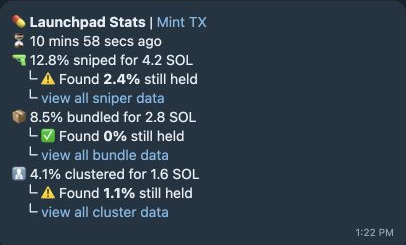
Launch activity
Section titled “Launch activity”| Field | Meaning / options |
|---|---|
| Pad / DEX icon · Mint TX | The launchpad or DEX and the transaction anchoring token creation or main pool creation. |
| ⏳ Age | Time since token creation on the launchpad or main DEX pool creation—not necessarily the same age. |
| 🔫 Sniped | Supply bought in the launch slot, next slot, or within one second. |
| 📦 Bundled | Detected shared-transaction or confirmed Jito-bundle buying, including a buy bundled with the mint event. |
| 👨👧👧 Clustered | Detected coordinated buying through a shared program and timing pattern. |
| % / for amount | Share of supply acquired and detected spend. Spend can include SOL and other quote tokens; (partial) marks incomplete valuation. |
| Found % still held | Tokens still located with those buyers and traced recipients. ✅ zero; ⚠️ positive; N/A unavailable. |
| Sniper / Bundle / Cluster PnL | Estimated result for that group when history and valuation support it. |
| view all … data | Opens the corresponding group’s wallets and activity. |
Groups can overlap—do not add their percentages. Investigating tx history… means balances/activity are still being resolved. No data available means the launch window could not be shown.
Sniper Data
Section titled “Sniper Data”Tap view all sniper data to open the sniper detail message for that section’s launchpad or DEX pool event.
- Summary: supply sniped, detected spend, supply still held, and supported totals for buys, sales, and PnL.
- Wallets: the detected snipers, with their launch buys, current holdings, sales, transfers, SOL balances, and funding details.
- view all transfer data: follow tokens a sniper sent onward. See Transfers for the trace fields.
The summary covers the group; each wallet row shows that buyer’s activity.
Bundle & Cluster Data
Section titled “Bundle & Cluster Data”Tap view all bundle data or view all cluster data. Both use the event-and-wallet layout below.
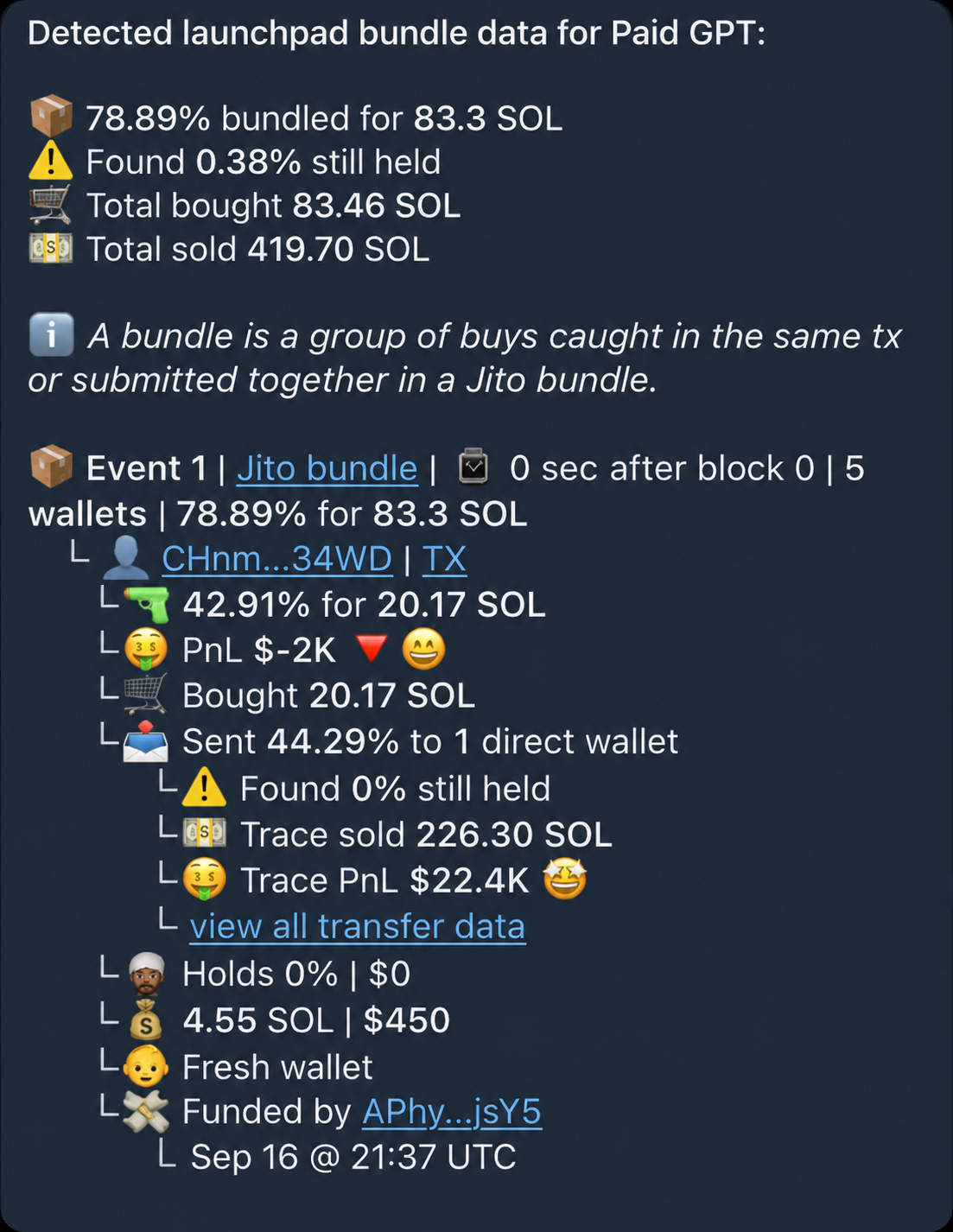
| On screen | Meaning / options |
|---|---|
| Bundled / Clustered % | Supply acquired by the group and detected spend. Found % still held includes traced recipients; buys, sales, and supported PnL summarize the group. |
| Event 1 | One detected buying event. More events can appear on later pages. |
| Jito bundle / Multi-buy tx / Program | A bundle is a confirmed Jito bundle or buys within one transaction. A cluster shows the shared program behind a coordinated buying pattern. The Jito or program link opens its explorer. |
| Time after block 0 / wallets / % / amount | When the event happened relative to launch, how many wallets joined, and their combined supply and spend. |
| Wallet / TX | A participating wallet and its buy transaction. The rows below show its contribution, PnL, later activity, holdings, balance, and funding. |
| Sent / Trace sold / Trace PnL | Tokens moved onward and the traced recipients’ results. view all transfer data opens that trace. |
The pictured wallet holds 0% but sent tokens to another wallet. Zero holdings alone does not mean it sold everything.
First Buyers
Section titled “First Buyers”Tap view all first buyer data to open the full data for that event. It starts with Launchpad or Dex LP Stats, then lists the investigated first buyers—including wallets outside the sniper, bundle, and cluster groups.
Pad First Buyers bought around token creation; Dex First Buyers bought around main pool creation. The sniper label changes from Sniped launch! to Sniped LP Mint!.
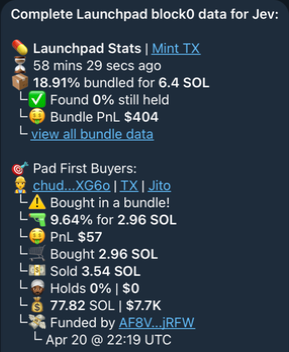
| Row | Meaning / options |
|---|---|
| Address / TX / Jito | Wallet explorer, buy transaction, and confirmed bundle explorer when available. |
| Wallet icon | 👷 deployer · 👤 ordinary wallet · 🤖 bot · 🥸 migration account · 🤡💅🌈 manual migration · 💊 Pump.fun Mayhem wallet. A platform label can identify StonkFun or Mayhem. |
| Buy label | Sniped launch!, Bought in a bundle!, Bought in a sus cluster!, Manually migrated!, or elapsed time after block 0. Sus Jito bundle! can appear separately. |
| 🔫 % for amount | Supply acquired and spend for the identified buy. Very small amounts can use less than 0.001%; unknown token receipts show receipt unknown. |
| Sold / PnL | Detected sales and estimated result, when supported. |
| 📤 Sent / view data | Tokens transferred onward; opens the transfer trace. |
| Holds / SOL | Token supply still held, estimated USD value, and wallet SOL balance. ⚠️ means tokens remain; 👳🏾♂️ means zero; ❔ / N/A means unavailable. |
| Fresh wallet / Funded by | Wallet funding context and UTC funding time. |
The main report previews up to three buyers. This detail view opens the longer list. Partial or unavailable history can replace the activity rows.
Pages and controls
Section titled “Pages and controls”Use ◀️ / ▶️ when more pages are available; · means there is no page in that direction. Bundle and cluster pages follow events and their wallets; sniper and first-buyer pages follow the wallet list. 🗑 closes the message.
Partial history / (partial) means some activity or value is missing. Those labels are hidden only in the edited example above.
Pattern detection and coverage
Section titled “Pattern detection and coverage”- Sniped: a buy in the launch event’s slot, next slot, or within one second.
- Bundled: multiple buyers in one transaction, multiple token buys in one confirmed Jito bundle, or a buy bundled with the mint or pool-creation event.
- Clustered: at least three eligible single-buy transactions using the same non-allowlisted program in the same slot/time or a wave within 15 seconds. This classification excludes sniped and bundled buys.
These are transaction patterns, not proof of shared ownership or malicious intent. Sniped and bundled totals can overlap. Each investigation targets up to 15 transaction records around the launch event, not every buyer. Missing history or Jito data can leave gaps. Wallet balances and funding details update separately from launch transactions.