
Deployer Intelligence
Open Deployer Intelligence
Section titled “Open Deployer Intelligence”- Command: send
/dev <token mint or deployer wallet>. - Main report: tap View Deployer Intelligence in Deployer Stats.
- Detail view: tap View Detailed Report → Deployer Intelligence.
Deployer overview
Section titled “Deployer overview”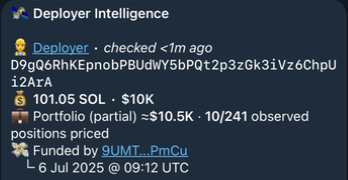
| Field | Meaning |
|---|---|
| Deployer / address | The wallet being investigated; the link opens its explorer. |
| Checked | How recently this information was checked. |
| SOL / $ | Wallet SOL balance and estimated USD value. |
| Portfolio / positions priced | Estimated wallet value and pricing coverage. 10/241 means ten of 241 observed positions were priced; partial means the value is incomplete. |
| Funded by / date | Observed funding wallet and UTC funding time. |
Track Record
Section titled “Track Record”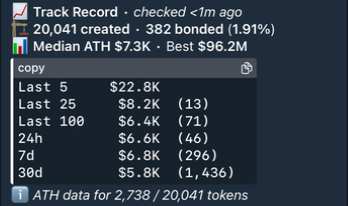
| Field | Meaning |
|---|---|
| Created / Bonded | Known launches and how many completed bonding, with the bond rate. |
| Median ATH / Best | Median lifetime all-time-high market cap and the highest known lifetime peak. |
| Last 5 / 25 / 100 | Median lifetime ATH for the most recent launch groups. |
| 24h / 7d / 30d | Median lifetime ATH for tokens created within each time window. |
| (N) / ATH data for N / total | How many tokens have usable ATH data in that row or across the history. |
In this example, ATH statistics use 2,738 of 20,041 tokens. Missing ATH data is not counted as a failed launch. ≥ marks a known minimum.
Breakouts
Section titled “Breakouts”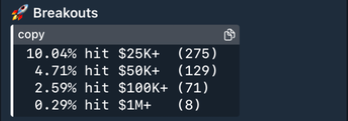
The percentage of launches with ATH data that reached each market-cap threshold. The number in brackets is the token count. A token reaching $1M also counts toward the lower thresholds.
Launch Analysis
Section titled “Launch Analysis”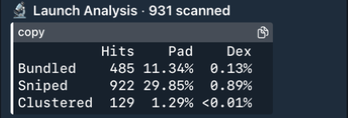
- Scanned: launches included in the activity analysis.
- Hits: launches where that buying pattern was detected.
- Pad / Dex: average supply percentage across available measurements for each event type.
- ? means unknown; – means no detected hits where measurements are available.
Launchpad/DexLP Stats explains the bundled, sniped, and clustered patterns.
Created Tokens
Section titled “Created Tokens”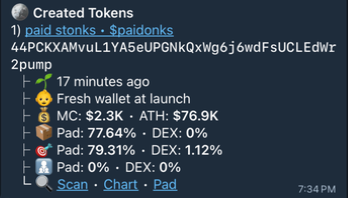
Each entry shows its name, symbol, mint, age, current MC, lifetime ATH, and available Pad / DEX bundle, sniper, and cluster percentages. Fresh wallet at launch describes the creator at token creation.
Scan opens a Trench Report; Chart opens the chart; Pad opens the launchpad page. Created Tokens (3,751 of 20,041 observed) means the available list covers part of the known history.
Holdings
Section titled “Holdings”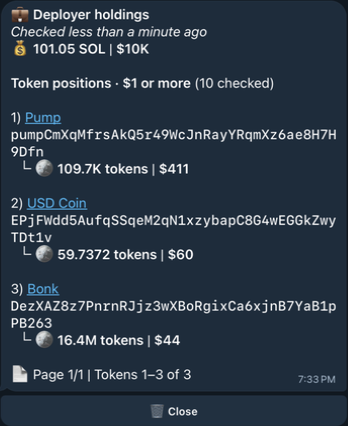
View holdings opens the SOL balance and priced token positions worth $1 or more. Each row shows the token, mint, amount, and estimated value. 10 checked describes the positions checked; it does not mean ten passed the $1 filter.
Buttons
Section titled “Buttons”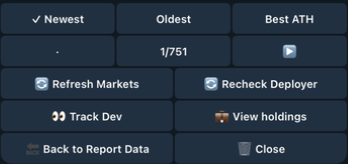
| Button | Action |
|---|---|
| Newest / Oldest / Best ATH | Sort the created-token list. |
| ◀️ / ▶️ / page count | Browse pages; · means no page in that direction. |
| Refresh Markets | Update visible market values. |
| Recheck Deployer | Refresh creator evidence and Track Record. |
| Track Dev | Open Watcher for the report’s deployer address. |
| View holdings | Open the holdings list. |
| Back to Report Data | Return to the report’s detail menu, when opened from there. |
| Close | Close the message. |