
Scan EVM token contracts
Trenchy offers basic EVM token scanning alongside its Solana reports. Send /scan <contract address> to @TrenchyBot, replacing the brackets with the token’s full 0x address. You can also paste the address by itself when the bot can see your message. Trenchy checks the configured networks and identifies the chain; you do not need to choose one.
The configured discovery networks are Ethereum, BNB Chain, Base, Arbitrum, Polygon, Optimism, Avalanche, and Robinhood Chain. A usable report requires one unambiguous, confirmed contract. Report fields vary by network and by the evidence available for that token.
Start with the address
Section titled “Start with the address”Copy the token contract address from a source you trust and compare every character. Token names and symbols can be copied. Send a plain 40-hex-character 0x address, not an explorer link or a network name. A wallet address and a token contract address serve different purposes.
In a group, /scan <contract address> is more reliable than a bare address: Telegram’s group privacy settings may prevent the bot from seeing an ordinary message. The bot also needs permission to reply. Existing group and scan limits still apply.
Read the report
Section titled “Read the report”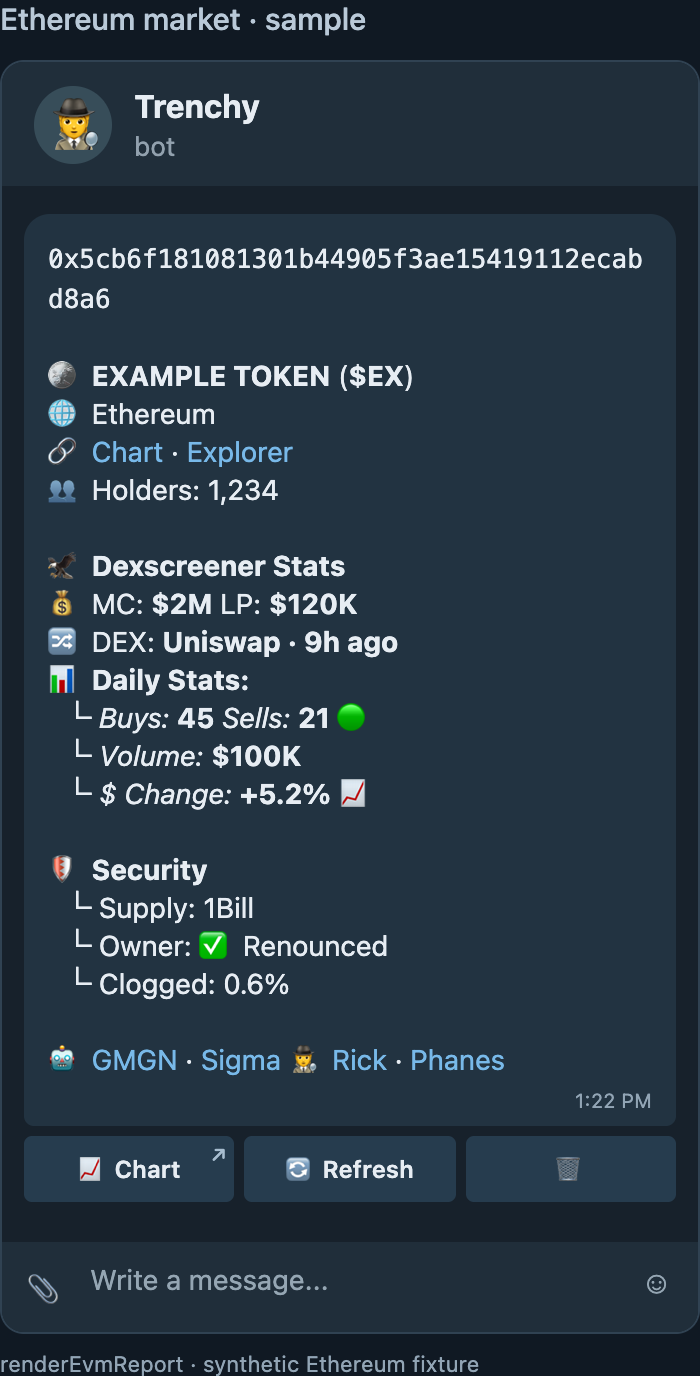
The report can show the following sections. Missing observations are left blank; they do not mean zero activity or that a check passed.
| In the report | What it means |
|---|---|
| Contract, token, and network | The exact 0x contract, available name and symbol, confirmed network, and links such as Explorer or Chart. |
| Holders / Top 10 | Available holder count and concentration, including pool, contract, and burn addresses. Top-10 share appears only with usable bounded holder evidence; holder coverage varies by network. |
| Dexscreener Stats / Daily Stats | Available data for one selected DEX pool: MC or FDV, liquidity, DEX and pool age, recent buys, sells, volume, and change. It is a market observation, not a trade quote. |
| Security | Evidence-dependent supply, owner, pause flag, possible declared controls, sampled taxes, or supported liquidity custody. An absent field is not an all-clear. |
| Deployer Stats | When a deployer can be identified, a linked address and available token or native-coin balances, with estimates where price evidence exists. |
| Snipers | When supported, Block 0/1 early pool buys or a separately verified launch scope. This is bounded activity evidence, not proof of a buyer’s intent. |
Top 10 is not a measure of individual traders alone. With a complete holder page, the percentage uses the balances returned by the holder provider. A ~ marks an estimate that compares the largest indexed balances with supply read from the network; those sources may reflect different times. Holder data is currently unavailable on Robinhood Chain.
Owner: Renounced means the observed owner() getter returned the zero address; other roles or controls may still exist. Declared functions are names found in verified source, not proof that a function can be invoked. A displayed tax is a bounded observation for a particular route, size, and time, not a guaranteed future rate. Burned or locked liquidity percentages appear only when their supporting custody evidence is available.
Use Chart when a market link is available, Refresh to request an updated report, or 🗑 to close the message. Some reports also offer Buyer wallets for a supported early-buyer cohort. Refresh can still return partial data, and later background evidence may appear only on a subsequent refresh.
The GMGN, Sigma, Rick, and Phanes footer links open external bots. A visible link does not confirm that the other bot supports the reported chain. Trenchy does not offer EVM trading through this report.
When market data is missing
Section titled “When market data is missing”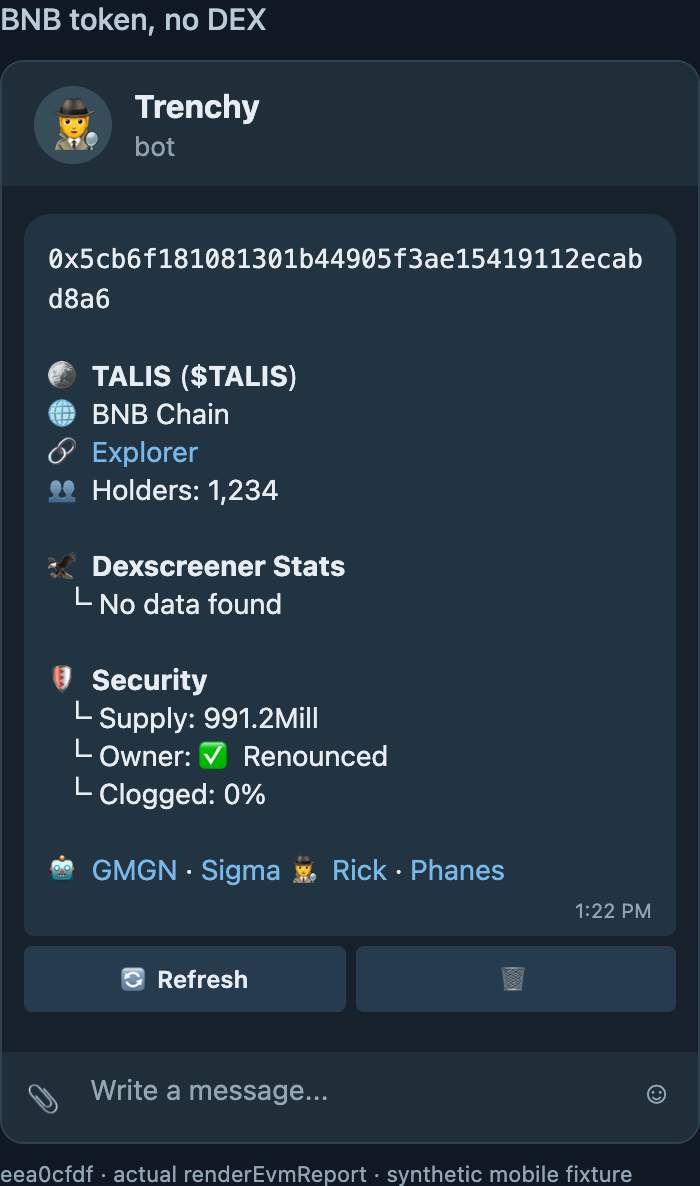
A confirmed contract can still produce token and contract information when no DEX pair is found. The Dexscreener Stats → No data found row means there is no supported market observation for this scan. It does not mean the contract is invalid, and Trenchy does not invent a price or an all-time-high (ATH) figure.
If Trenchy replies Token not found, it could not confirm a contract on one unambiguous network. Recheck the full contract address; the message alone is not proof that no contract exists.
If verification is temporarily incomplete or a required provider is unavailable, Trenchy replies ⚠️ Unable to check this token right now. Please try again shortly. Wait a little, then retry the same address.
An EVM report is research assistance, not a safety certificate, a guarantee that you can sell, or a prediction that you will make money. Review the linked contract and market evidence before acting. Trenchy’s Trading tools are coming soon for general users and are not part of EVM scanning.